


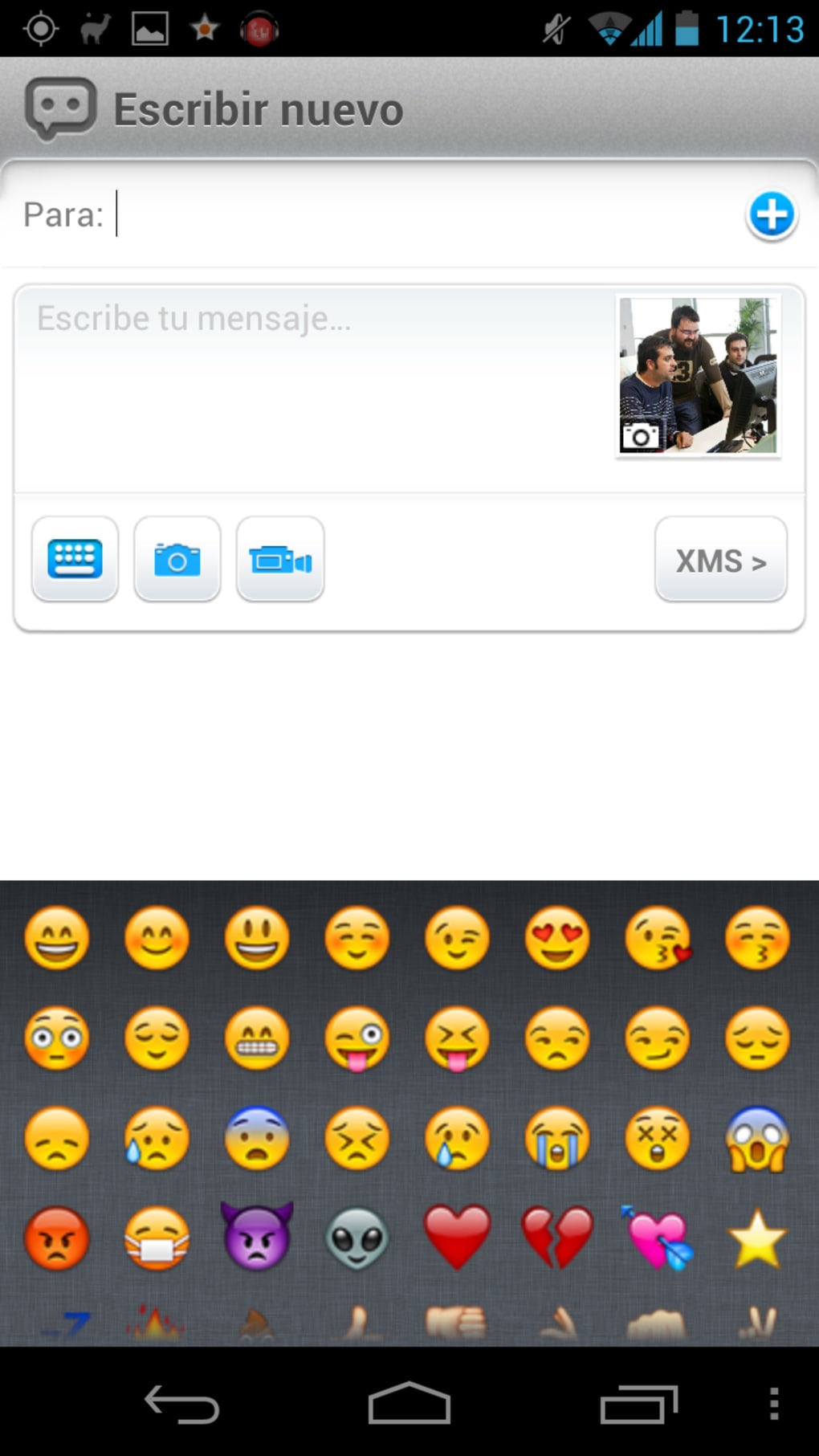

Download eBuddy XMS – messaging app, free chat, Android messaging, send photos, send videos, eBuddy XMS, secure messaging, instant messaging, chat app
Overview
eBuddy XMS is a free messaging application designed for Android users seeking a straightforward way to exchange text messages, photos, and videos over the internet. Positioned as a modern alternative to legacy messaging platforms, the app enables users to communicate with others who have also installed eBuddy XMS, creating a closed messaging ecosystem. The software aims to solve the challenge of fragmented communication by offering a unified platform for multimedia sharing without relying on traditional SMS or carrier-based services.
Targeted primarily at consumers and casual users, eBuddy XMS is ideal for individuals who want to send rich media content without incurring data or messaging charges. It functions similarly to popular apps like WhatsApp, though with a more limited feature set. The app is especially suited for users looking for a lightweight, no-cost messaging solution with basic multimedia support. Real-world use cases include sharing vacation photos with family, sending quick video clips to friends, or maintaining informal group conversations with peers.
Developed by eBuddy, the app leverages internet connectivity to deliver messages and media files securely. While the developer’s background is not detailed beyond the brand name, the app’s design suggests a focus on simplicity and accessibility. Setup requires a phone number and an SMS-verified activation code, followed by a PIN assignment for account identification.
Key Features & Capabilities
- Text Messaging – Users can send and receive instant text messages to other eBuddy XMS contacts, enabling real-time communication without SMS fees.
- Photo and Video Sharing – The app supports the sending and receiving of photos and videos directly through the internet, allowing users to share visual content without relying on email or cloud storage.
- Group Messaging – eBuddy XMS includes a group chat feature, enabling users to create conversations with multiple contacts simultaneously, useful for family, friends, or small teams.
- Contact Integration – Users can scan their phone’s contact list or Facebook friends to identify other eBuddy XMS users, streamlining the process of adding new contacts.
- PIN-Based Account System – After registration via phone number and activation code, users receive a unique PIN that can be used to connect with others, offering an alternative to phone number-based discovery.
- Cross-Platform Messaging – The app allows communication between eBuddy XMS users across different platforms, enhancing connectivity for users on various devices.
These features support everyday communication needs such as quick check-ins, event coordination, and sharing personal moments. The absence of voice message support distinguishes it from competitors, but its focus on visual content and group interaction fills a niche for users prioritizing image and video exchange.
User Interface, Workflow & Performance
The user interface of eBuddy XMS appears to follow a standard messaging app layout, with a chat list on the left and active conversation window on the right. Navigation is likely intuitive, allowing users to switch between conversations, access settings, and manage contacts with minimal effort. The workflow begins with phone number registration, followed by SMS-based activation and PIN assignment, which is a familiar process for many messaging apps.
Once set up, users can initiate chats by selecting a contact from their list or searching by phone number or PIN. The app’s design emphasizes simplicity, minimizing clutter to enhance usability. However, the developer did not specify resource usage details, so exact performance behavior—such as CPU or RAM consumption—cannot be confirmed. General software behavior suggests stable operation under typical conditions, though performance may vary depending on device capabilities and network quality.
Stability and reliability are expected to align with standard Android messaging applications, particularly given the app’s lightweight size of 12.3 MB. Users can anticipate smooth operation on devices with moderate processing power and sufficient memory, though real-world performance data is not available.
Compatibility & System Requirements
eBuddy XMS is designed exclusively for the Android operating system, with a release version of 1.0.12. The app has a compact installation size of 12.3 MB, indicating a lightweight footprint that should not strain storage on most devices. However, the developer did not specify exact system requirements, including minimum Android version, RAM, or processor specifications.
Platform compatibility information is limited to Android, and no details were provided about support for tablets, wearables, or other device types. The absence of such data means users should exercise caution when installing on older or less common Android devices. It is recommended to ensure the device runs a current Android version to maximize compatibility and security.
Pros and Cons
Pros
- Free to download and use with no in-app purchases
- Supports sending photos and videos over the internet
- Includes group messaging for collaborative conversations
- Lightweight installation at 12.3 MB
- Simple setup using phone number and SMS verification
- Offers PIN-based contact discovery for privacy-focused users
Cons
- Lacks support for audio message recording and sending
- Exact system requirements were not listed
- Platform compatibility is limited to Android only
- No information on offline functionality or message delivery guarantees
- Depends on both parties having the app installed for communication
FAQ Section
Is eBuddy XMS available for iOS devices?
Currently, the app is only available for Android. No information is provided about iOS support.
Is eBuddy XMS safe to use?
The app uses internet-based communication and requires phone number verification. While the developer did not provide specific security details, using a trusted app from a known developer may reduce risks.
Can I use eBuddy XMS without an internet connection?
Due to its reliance on internet-based messaging, the app requires an active connection to send or receive messages. Offline functionality was not specified.
How do I update eBuddy XMS?
Updates are likely delivered through the Google Play Store. Users should check for updates in the app’s store listing.
Is eBuddy XMS a permanent free app?
The app is listed as free with no in-app purchases mentioned. However, future monetization plans were not disclosed.
Final Thoughts + CTA
eBuddy XMS presents a simple, no-cost solution for Android users who want to send photos, videos, and text messages over the internet. While it lacks advanced features like voice messaging and has limited platform support, its core functionality is well-executed and accessible. The app’s lightweight design and straightforward setup make it suitable for casual users seeking an alternative to mainstream messaging apps.
For those who value privacy, ease of use, and multimedia sharing, eBuddy XMS offers a viable option—especially when coordinating with friends or family already using the platform. Its PIN-based contact system adds a layer of control, and the inclusion of group chats enhances its utility for small communities.
Download eBuddy XMS now






.png)
